Building and Uploading a Social Media Contact List to Your Facebook Business Page
So you’ve taken on the task of starting social media campaigns for your North County San Diego small business. Facebook and Twitter profiles are up and running, now what?
Now start building fans, followers, loyal subjects, and brand ambassadors – but how?
First, you need a list. How to start building that loyal sphere of influence on your foundational social media presence – Facebook – is the focus of this post. The good news is, building and using your social media contact list is relatively simple.
Figure out where your social media contact list will come from – do you want to send Facebook invites to your entire email address book, or all of your professional contacts? Or both?
Nobody is going to be that offended your business reached out to them on Facebook – especially if they are already connected to you in some way…they’ve already purchased something from you. If your business doesn’t reach out to connect with new and existing local customers, someone else will.
So, where will you get this magical social media contact list, and how will you build it?
You already have it. It’s a list of customer email addresses. You can also upload all personal address book contacts, professional contacts – or both. Again, it’s your choice.
Now, think about a list of customers – everyone who has ever bought from or inquired about your business. Where will they come from?
You probably already have a list of either newsletter recipients, mailing lists, or a simple ‘export’ of your accounting software could produce a couple thousand emails in a minute or two – if you’ve been actively collecting and updating those emails over the past few years…
If not, no big deal. Just get started doing so now, like today!
We want to compile a list of email addresses, and store them in one place – probably the most universal place for most people, being an Excel file*. This should take a grand total of 5 minutes if you already have some addresses. And you don’t need a whole bunch, if you have 10 that’s fine – upload and connect with those people. You’ve heard that rule of thumb about word of mouth right?
*(We’re not interested in debating Mac vs. PC, just going by the stats of what is most widely used. Please choose whichever method works best for you).
You also have the opportunity to collect more email addresses every day. People come into your business, and your business talks with people over the phone and via email. Just make sure you remain diligent in asking for that information.
How to Build Your List?
- THINK about where your social media contact list will come from?
- Small business accounting software
- Email newsletter mailing lists
- Email address books (personal or professional)
- Collect email addresses in one place (your mode of choice)
- Save the emails in your mode of choice. For Excel users, YOU NEED TO SAVE THE FILE IN A SPECIFIC FORMAT – .csv is the probably the most universal method.
Your list is now built. And saved someplace you can easily access (and backed up accordingly). Maintain it, pay attention to it, nurture it, and update it. This should be part of the daily or weekly communications process that requires very little administrative time once things get up and running. Asking for and updating an email address is like making sure you have someone’s correct phone number – in fact, while we’re at it, prepare now for the mobile access of your small business information if you are not currently doing so: COLLECT, MAINTAIN, UPDATE all customer or prospect MOBILE phone numbers. Again, if we’re talking social media here, you probably already do this. But just in case…wink, wink.
Next week for example, someone can walk into your Carlsbad pizza shop slamming away on their mobile phone and tag your location on Foursquare…ipso facto, they just told all of their virtual friends how good those slices were. (And we all usually have more virtual friends than real friends, right?…get the picture?)
Ok, back to the point.
How to Upload Your Social Media Contact List to Your Facebook Business Page?
- Login to your Facebook Business page.
- Click the ‘Getting Started’ tab. Then the ‘Import Contacts’ tab.
- Click ‘Browse’ to find the list you just created and saved someplace easily accessible.
- You will have the ability to preview the list and the mailing invitation prompting people to connect with your business on Facebook. That’s it; now put your list to work for you!
- Send the invites!
This process will jump-start your customer recruitment strategy and immediately result in positive conversions. How many people will ‘Like’ your Facebook page?
That depends on the existing relationship, which we will also partner with you to cultivate and evolve. Please don’t think Facebook will automatically turn your small business into a social butterfly.
If your business was a shut-in before the social media revolution, the zero to sixty approach will come off as inauthentic. A simple and methodical approach is needed to gradually integrate social media tools into your customer recruitment, retention, and communication strategies.
To start, you have your social media contact list, you’ve uploaded it to your Facebook business page, and you’ve invited your entire contact list to connect with your North County San Diego small business on the second most popular website in the world (http://www.alexa.com/siteinfo/facebook.com).
Good job!
P.S. – Adding an incentive right off the bat for people to connect should result in even more people who connect with your business on Facebook, just make sure you include the ‘Like’ stipulation. In order for new connections to qualify for whatever discount or freebie you offer, make sure they first must ‘Like’ your business page.
To Add Personal Email Contacts or Generate Contact Lists from Your Email Application:
For those of you that wish to include personal email contacts, Facebook does a pretty good job of making that easy. But here are the directions.
If you’d like to upload contacts from email address books, simply login to your Facebook page:
- Click the ‘Getting Started’ tab
- Click ‘Import Contacts’
- Enter your email info and follow the directions
- You can even create a separate file to save your email contacts, simply by following the directions Facebook provides for you here:
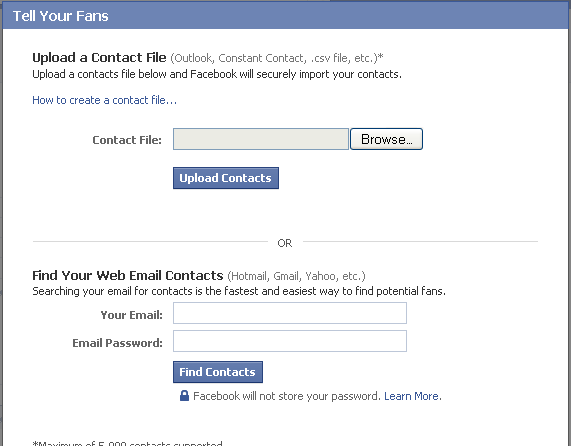
*Keep in mind, in order to upload PERSONAL email contacts, Facebook will ask for YOUR email address, and YOUR PASSWORD. For those of you that would rather not give out that info, simply CONTROL the list INFORMATION you GIVE to Facebook.
In future installments we will concentrate on the repeated recruitment strategies, and tilling the social landscape to cultivate an engaging, informative, and fun social media environment for your Carlsbad small business.